KAS Simulator Menus Description
File Menu
| Command | Description |
|---|---|
| Start | Start the application with the Retain Variables. |
| Cold Start | Start the application with the initial settings |
| Stop | Stop the application |
| Option | Set parameters for the KAS Simulator application (see explanations below) |
| Exit | Leave KAS Simulator application |
Option
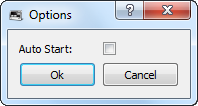
Figure 5-73: Options for KAS Simulator
| Option | Description |
|---|---|
| Autostart | Autostart the application when KAS Simulator is launched. Autostart mode is recommended when a system is in production. |
-
-
Parameters are saved in the Options.bin file located under:
<user>\AppData\Local\Kollmorgen\KAS\Sinope Simulator\Resources\
Help Menu
| Command | Description |
|---|---|
| About | Show version numbers and other Find KAS IDE Version about KAS Simulator |


